❄️Day 26 - Jenkins Declarative Pipeline

Hey there! 👋
I'm Pratik R. Mandge, a DevOps Engineer passionate about all things AWS DevOps Technology. Currently on a learning adventure, I'm here to share my journey and Blog's in the world of cloud and DevOps.
🛠️ My focus? Making sense of AWS services, improving CI/CD, and diving into infrastructure as code. Whether you're fellow interns or curious enthusiasts, let's grow together in the vibrant DevOps space.
🌐 Connect with me for friendly chats, shared experiences, and learning moments. Here's to embracing the learning curve and thriving in the exciting world of AWS DevOps Technology!
Follow me on LinkedIn: https://www.linkedin.com/in/pratik-mandge363
✨What is Pipeline?
In simple terms, a pipeline in Jenkins is like a workflow or a series of steps that define how your software is built, tested, and deployed. It's a way to automate these processes so that whenever you make changes to your code, Jenkins can automatically build, test, and deploy your software without you having to do it manually. This helps in ensuring that your software is always up-to-date and works correctly.
✨Declarative Pipeline
A Declarative Pipeline in Jenkins is a more structured and simplified way to define a Jenkins pipeline compared to the Scripted Pipeline. It uses a predefined structure and provides a more opinionated and guided way to write pipelines.
In a Declarative Pipeline, you define the pipeline using a specific syntax in a Jenkinsfile. This syntax includes predefined sections such as pipeline, agent, stages, and steps, which help organize and define the different parts of your pipeline.
The main advantages of using a Declarative Pipeline are:
Simplified Syntax: The syntax is more intuitive and easier to understand, especially for beginners or those unfamiliar with Groovy scripting.
Built-in Stage View: Declarative Pipelines automatically generate a visual representation of your pipeline stages, making it easier to visualize the flow of your pipeline.
Easier Error Handling: Declarative Pipelines provide better support for error handling and recovery, with built-in mechanisms for retrying failed steps or stages.
Rich Plugin Ecosystem: Declarative Pipelines can make use of the vast library of Jenkins plugins, allowing you to easily integrate with other tools and services.
Overall, Declarative Pipelines provide a more structured and guided approach to defining Jenkins pipelines, making them easier to write, read, and maintain.
✨Scripted Pipeline
A Scripted Pipeline in Jenkins is a way to define a Jenkins pipeline using Groovy code. Unlike Declarative Pipelines, which have a more structured and opinionated syntax, Scripted Pipelines allow for more flexibility and complexity in defining your pipeline.
In a Scripted Pipeline, you write Groovy code directly in the Jenkinsfile to define the build stages, steps, and any conditional logic or loops needed for your pipeline. This gives you more control over the flow of your pipeline and allows you to customize it to fit your specific requirements.
Some key features of Scripted Pipelines are:
Flexibility: Scripted Pipelines allow you to define your pipeline using Groovy code, giving you the flexibility to create complex build processes with custom logic and conditions.
Advanced Concepts: With Scripted Pipelines, you can use advanced Groovy features such as functions, classes, and libraries, allowing you to create more sophisticated pipelines.
Integration: Scripted Pipelines can easily integrate with external tools and services using Groovy libraries or by making HTTP requests directly from the pipeline script.
Learning Curve: Scripted Pipelines have a steeper learning curve compared to Declarative Pipelines, as they require knowledge of Groovy programming.
Overall, Scripted Pipelines are a powerful tool for defining Jenkins pipelines when you need more control and flexibility than what is provided by Declarative Pipelines.
✨Why you should have a Pipeline?
Having a pipeline in your software development process, especially in a CI/CD (Continuous Integration/Continuous Deployment) setup, offers several key benefits:
Automation: A pipeline automates the process of building, testing, and deploying your software, reducing the manual effort required and minimizing human error.
Consistency: A pipeline ensures that your software is built, tested, and deployed in a consistent and repeatable manner, regardless of who is performing the process.
Speed: By automating and streamlining the development and deployment process, a pipeline helps you deliver new features and updates to your software more quickly.
Visibility: A pipeline provides visibility into the status of each stage of your development process, making it easier to identify and troubleshoot any issues that arise.
Reliability: A pipeline helps ensure that your software is always in a deployable state, as each change goes through a series of automated tests before being deployed.
Scalability: A pipeline can easily scale to accommodate changes in your development process or increases in workload, making it suitable for projects of any size.
Overall, having a pipeline in your software development process can improve the efficiency, reliability, and quality of your software delivery process, helping you deliver better software to your users more quickly and consistently.
🔗Pipeline syntax
pipeline {
    agent any
    stages {
        stage('Build') {
            steps {
                //
            }
        }
        stage('Test') {
            steps {
                //
            }
        }
        stage('Deploy') {
            steps {
                //
            }
        }
    }
}
⛏Task - Complete Declarative pipeline example.
To create a new job in Jenkins using a Declarative Pipeline, you can follow the official Jenkins "Hello World" example. Here's a step-by-step guide:
Create a New Item:
Go to your Jenkins dashboard and click on "New Item" to create a new job.
Enter a name for your job (e.g., "HelloWorldPipeline") and select "Pipeline" as the job type.
Click "OK" to create the job.
Define the Pipeline:
In the job configuration page, scroll down to the "Pipeline" section.
Select "Pipeline script" from the "Definition" dropdown.
Copy and paste the following Declarative Pipeline script into the "Script" text area:
  pipeline {
      agent any
      stages {
          stage('Hello') {
              steps {
                  echo 'Hello, World!'
              }
          }
      }
  }
This script defines a simple pipeline with one stage (Hello) that echoes "Hello, World!".
Save the Job:
- Click "Save" to save your job configuration.
Run the Pipeline:
Click on "Build Now" to run the pipeline.
Jenkins will start a build of your pipeline and you should see the output "Hello, World!" in the build console output.
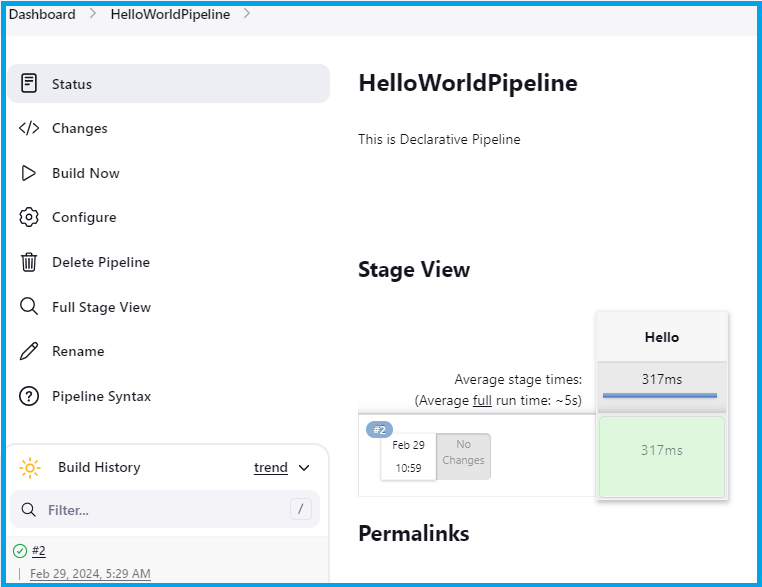
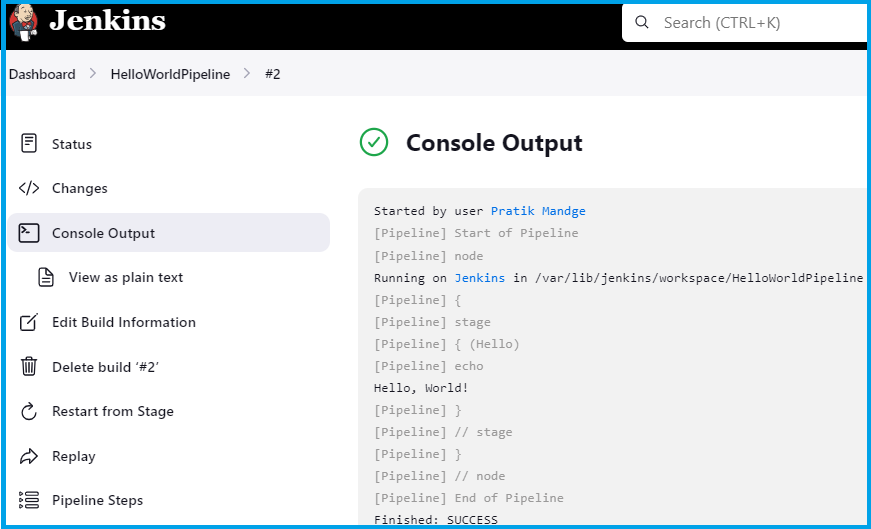
That's it! You've created a new job in Jenkins using a Declarative Pipeline and run the official Jenkins "Hello World" example.
🎊Conclusion:
In a Jenkins Declarative Pipeline, the pipeline block is used to define the entire build process, including the agent to run the pipeline, stages, and steps within each stage.
I think this blog will be quite valuable, offering unique viewpoints and introducing new and engaging ideas. 🙏
😊 Happy learning!


